Thursday, January 29, 2009

Jing for screencasts

So if a picture (of your desktop) is worth a thousand words, what's a screencast worth ?

I'll tell you what it's worth ... to a web developer struggling to communicate with a quality assurance engineer, it's ten or so e-mails, a hundred lines of instant messages and a couple of VOIP sessions.

Enter the Jing Project.

Jing is a free desktop application that allows you to create a screen shot or video of your desktop or a portion of your desktop. Dave was the one who recommended it a couple of years back and it's really been helpful as a tool to communicate with QA and even with clients.


So what do I like about Jing ....
  • It's relatively easy and straightforward to use. No complex settings and options.
  • You can capture your entire desktop or just a portion of your desktop
  • The option to easily upload to screencast.com or to an FTP server
  • Captures sound as well so you can narrate and talk while creating your screencast
My only qualm about Jing is that there is no Linux version but I believe it's in the pipeline. Download Jing from www.jingproject.com

Wednesday, January 28, 2009

Git Tip : svn cleanup for git

With subversion, I execute "svn cleanup" on a working copy to make sure that my working copy is clean.

On git, the command seems to be :

git checkout -f master

Tuesday, January 27, 2009

Beginning adventures with Xen

I've been a fan of virtualiztion since VMware gave away VMware Server for free. I've upgraded the host OS on my desktop twice and I have been able to remain productive as all my work resides on a separate disk and in virtual machines.

However, since VMware Server 2.0 was released, I've been actively looking for alternatives. Coincidentally, our hosting provider will be implementing Xen soon for LAMP deployments and I thought this to be the perfect excuse to at least install and try it out.

Well, so far I'm stuck because I can't boot to X windows on the Xen Kernel because I'm using nvidia drivers. I'm sure there is a solution already somewhere but I'm going to stop for now and leave it as something to look forward to solving over the coming weekend ;-)

Build your own distro with Suse Studio

Countless are the times when I had wished that there was a linux distribution with exactly the stuff I need and none of the bloat. With the Alpha release of Suse Studio, that wish is about to be fulfilled.

Suse Studio allows you to customize OpenSUSE with just the software you need thru an easy to use web interface. The end result can be an ISO, Disk, VMware or Xen image.

WOW

Monday, January 12, 2009

ExtJS Tip : Select the first row when grid is loaded

Let's say that you have a grid called "mygrid" and you would like the first row of that grid to be selected when the grid data is loaded. The following snippet of code should work ...

Ext.getCmp('mygrid').store.on('load', function(){
var grid = Ext.getCmp('mygrid');
grid.getSelectionModel().selectRow(0);
grid.fireEvent('rowclick', grid, 0)
}, this, {
single: true
});

More Watir ....

A few blog posts ago I narrated how I installed Ruby and Watir on Windows and posted my first test script.

Getting started is usually the hardest part of the learning experience. The reason being that you don't know where or how to get started. Luckily there is a plethora of resources and lots of good samaritans on the web sharing their experiences and solutions on forums and on their personal blogs.

Today I'm going to enumerate the resources I found on the web in the order that helped me get started with Watir.

http://wtr.rubyforge.org/index.html
For an overview of what Watir is and possibly how and why you need Watir

http://www.ruby-lang.org/en/downloads/
Before Watir, you must install Ruby.

http://wiki.openqa.org/display/WTR/Tutorial
This tutorial has everything you need to know on how to install Watir and its prerequisites. It also contains everything you need to know to get the basics down and start writing simple test scripts.

http://www.rubycentral.com/book/

Pretty soon you'll need to learn more advanced stuff like objects and classes. The online book is a great resource for this.

http://rasta.rubyforge.org/index.html
At some point you may want to organize your test scripts. One framework I found that works is Rasta.

http://rubyonwindows.blogspot.com/2007/03/automating-excel-with-ruby-application.html
Some people may not like the restrictions imposed by Rasta and would like to setup their own framework with MS Excel. Ruby is perfectly capable of manipulating Excel. VB for application developers will feel at home with Ruby.

Wednesday, January 07, 2009

Pageant with your SSH Private Key added on Windows Startup

On Linux, I use Keychain to cache my private SSH key and passphrase so that I don't need to keep entering it when I access remote servers. On windows, the only real tool for that is Pageant which comes with Putty.

A problem that I've been having for a while now is that I find myself having to start up pageant and adding my keys everytime I log in to windows.

I found this solution on the net but unfortunately I don't have the resource bookmarked so who ever reads this and knows the original author, I would love to know and post a link to the site.

The solution was to create a shortcut to Pageant in your Startup folder and to modify the "Target Property" and feed putty the key you want to add when it loads up.


So here are the steps :
  1. Click Start, then click All Programs
  2. Right click on the PuttY menu item and then choose Explore from the context menu
  3. This will open a window with the contents of the PuttY menu
  4. Once again, do a right click but this time in the Startup menu item after clicking All Programs, then choose Explore
  5. Copy the Pageant shortcut from the first window that appeared to the window with the Startup folder
  6. Right click on the shortcut in the Startup folder and change the Target field to look like
    "C:\Program Files\PuTTY\pageant.exe" "C:\My Documents\private.ppk"
  7. The first part of the above line with pageant.exe should already be in the target field, what you need to do is add the location of the private key you generated using PuttyGen.
So now, every time you login to windows, Pageant will automatically startup and add your key. It will also challenge you to enter the pass phrase on log in.

Monday, December 29, 2008

Impossible is Nothing

A friend of mine who is currently a runner and an aspiring tri-athlete posted a series of inspiring Youtube videos on his Facebook profile.

A couple of them were from Adidas' "Impossible is Nothing" campaign which reminded me of one of my favorite quotes of all time which also came from that ad campaign.

Impossible is just a big word thrown around by small men who find it easier to live the world they've been given than to explore the power they have to change it.

Impossible is not a fact. It's an opinion.

Impossible is not a declaration. It's a dare.

Impossible is potential.

Impossible is temporary.

Impossible is nothing.

Getting started with Ruby and Watir

As a web developer, I'm always on the look out for ways to improve the quality of the web applications I develop.

One of the tools that I am trying out recently is Watir (pronounced Water). It's too early for me to say whether it's as good as or better than Selenium but I have to admit, learning ruby in the process is a nice bonus. Compared to my experience learning TCL, I found Ruby to be easier to learn.

Here's a quick run down of the steps to get started with installing Ruby and using Watir. Before anything else, I would recommend absolute newbies to try this on Windows first because it will be much easier and quicker.
  1. Download the Ruby one click installer
  2. Double click on the file you download and follow the instructions to install ruby
  3. Open a command prompt and type the following to update ruby and install watir
  4. gem update --system
    gem install watir

  5. We would also want to run tests on firefox, so let's install additional ruby packages that will allow us to do that
  6. gem install firewatir

  7. To allow firefox to work with Watir, you'll need to install the jssh plugin for firefox.
I wrote a script to check if IE and Firefox works with Watir. Copy the script below into a file mytest.rb and save it to your computer.
# set the variables
validator_site = "http://validator.w3.org"
url_to_check = "http://www.google.com"
browser = "ff"

if browser == "ie"
require "watir"
ctrl = Watir::IE.new
else
require "firewatir"
include FireWatir
ctrl = Firefox.new
end

puts "1. Open validator site"
ctrl.goto validator_site

puts "2. Type url to validate"
ctrl.text_field(:name,"uri").set url_to_check

puts "3. Submit the URL"
ctrl.link(:class,"submit").click

puts "4. Results ... "
if ctrl.text.include? "Errors found"
puts " Test FAILED."
else
puts " Test PASSED!"
end

ctrl.close

To execute the script, open a command prompt and type

ruby mysite.rb

To try it with Internet Explorer, change the browser variable from 'ff' to 'ie'.

The script simply loads up the w3c validator site and submit "http://www.google.com" for validation. The command prompt will output messages as the script progresses. In the end, it checks whether the words "Errors found" is on the page and outputs a Success or Fail depending on whether those words are found or not.

Monday, December 22, 2008

I Dare You To Move

Once in a while, something stupid happens to everyone but what if that something stupid is so big, so life changing that it totally breaks you, saps you of all your confidence and renders you incapacitated.

If something like that were ever to happen to you, wouldn't you like someone to "Dare You To Move" ?

It's never easy isn't it ? You know you have to get up and continue but there's this huge weight on your shoulders that always reminds you of what happened. All we know is that we have to move forward "like today never happened" but nobody really knows how. I think it's because everybody is different. People find themselves in the most unexpected places.

So I really liked this song by Switchfoot. My favorite lines ....
Maybe redemption has stories to tell
Maybe forgiveness is right where you fell
Where can you run to escape from yourself?
Where you gonna go?
Where you gonna go?
Salvation is here

Yes, salvation is here !

Lots of videos from Youtube to choose from but not all of them have the line "salvation is here". There's just something oddly comforting about that line in the song so I chose a video with that line in it. Enjoy.

http://www.youtube.com/watch?v=3mN6mfI3hTE


Speaking of "lifting yourself up off the floor", I better start posting more blog entries soon or I'll fall off again :-)

Monday, December 15, 2008

Revenge of the Geeks

"Yes, But it's like the Greeks used to talk about the philosopher kings.
Geeks have no interest in power. The only power we're interested in is low power consumption
and longer battery life and low prices so we can stay up later at night. Geeks have no desire - geeks may inherit the earth, but they have no desire to rule it."

Robert Stephens on 60 Minutes December 30,2007

Sunday, December 07, 2008

And Into the Light ....

I can't remember when I first heard it. Some say that before you can step into the light you must know what darkness is.

It's been a while since I posted anything on this blog and I think it's about time for a make over.

Please bear with me as I tweak the heck out of this new template and get this blog going again.

Thanks,

Ham

Sunday, September 28, 2008

Pageant Sash and Tina Fey Glasses

I'm not a big SNL fan probably because I don't have a lot of time to wacth it but I have to give it to them. I almost had an asthma attack watching this one. My favorite part, where I literally fell to the ground laughing with tears in my eyes ...

FEY AS PALIN: "What an amazing time we live in. To think that just two years ago, I was a small town mayor of Alaska's crystal meth capitol. And now I am just one heartbeat away from being President of the United States. It just goes to show that anyone can be President."

POEHLER AS CLINTON: "Anyone."

FEY AS PALIN: "All you have to do is want it."

POEHLER AS CLINTON: (LAUGHS) "Yeah, you know, Sarah, looking back, if I could change one thing, I should have wanted it more." (RIPS OFF PIECE OF PODIUM)

Excerpt is from About.com. Check out About.com's political humor section by clicking the title above for the complete transcript of the skit.

Have a look and a laugh or worse an asthma attack from the entire SNL intro skit from NBC.com below.


Update : I just found out that Tina Fey reprised her role as Sarah Palin in another intro skit just last night. I don't think it was as funny as the first one but judge for yourselves, here's the video from NBC.com.

Monday, September 22, 2008

Use javascript to prevent firefox from loading stuff into your page

So say you have a cool Photo web application. It's so cool that people think that they can just drag photos from their desktop to anywhere on the page and it'll get uploaded, NOT.

Well at least not yet.

What happens is that firefox loads up the image totally replacing your page. To avoid that, add this line of code at the head of your html page and you should be all set.

window.addEventListener('dragdrop', function(event) { event.stopPropagation() }, false)

Changing HTML tag attributes with Javascript

Just in case I forget all about this and I'm sure someone may find it useful.

It's probably commonplace to access certain attributes like style and class but what if you want to set your own attributes on an html tag.

On ExtJS, you can add a quicktip to any html element by simpley adding "ext:qtip" attribute like so.

<div id='mydiv' ext:qtip='Empty div'>

Now what if you want to add or dynamically change the qtip on that element. Here's how I did it.

var newtip = document.createAttribute('ext:qtip');
newtip.value = "It's not empty anymore";
document.getElementById('mydifv).attributes.setNamedItem(newtip);

Sunday, September 07, 2008

Thoughts about YNG (YUI the Next Generation)

Yes, I'm a trekkie :-) So follow the link (click the title) already and find out what I think of YUI 3.0 over at the Solutiongrove Blog.

Wednesday, September 03, 2008

Google Chrome : First Impressions

Google Chrome Beta went live a few hours ago and I just couldn't resist installing it and giving it a spin.

I'm a bit disappointed that I had to boot up a virtual machine with windows to try it out as a Linux version of the browser isn't available yet but overall my experience with it has been positive so far.

It does somewhat remind me of Opera for some strange reason.

If this is the first time you've heard about Chrome, Google made available a nice online comic book explaining in layman's terms why they decided to create their own browser.

Download and Install

Download and install was easy. After clicking Download Google Chrome I was redirected to accept their terms of service. After that an application popup with a progress bar appears and shows me the download status. I appreaciate how I didn't have to download an installer and double click it afterwards. Google downloaded Chrome and started the install for me. How nice is that.

Once installation completes Chrome will import bookmarks and other resources from Firefox. There doesn't seem to be a way to opt out of that. It so happens that my Firefox browser was running and it warned me that it couldn't import stuff from a running browser. There was a button to Skip Import so I clicked that instead of turning off Firefox and letting it do the import.

Taking it for a Spin

Excited to see how this new browser does Ajax and DHTML,

I loaded up the Solutiongrove.com portal page ...
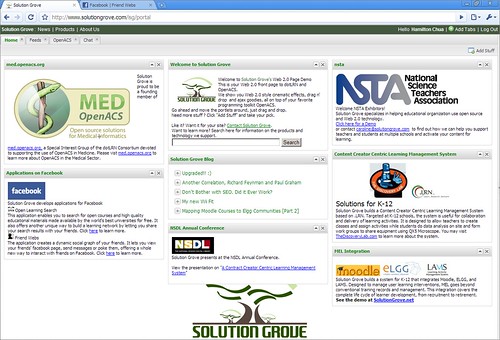
chrome-sgcom

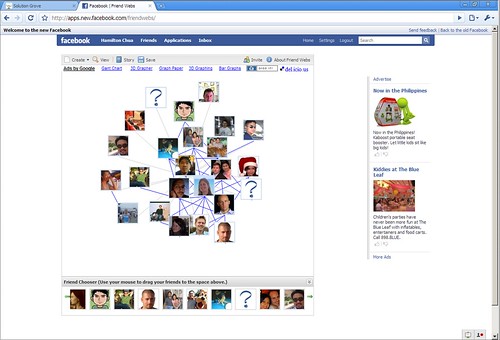
... and our Friend Webs facebook app

chrome-fw

Not bad !

Flash, SVG, Ajax and Javascript all work nicely and quite fast too. Java it seems though isn't supported yet.


chrome-javaplugin

Developer Tools

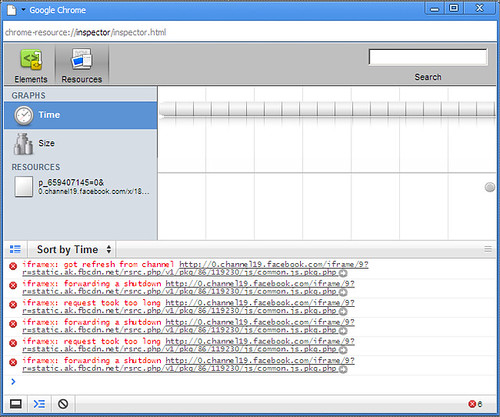
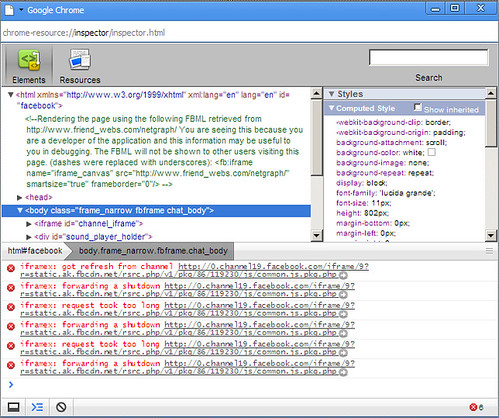
The saddest part about this is that I may one day (if it manages to steal enough market share from IE and Firefox) need to include this browser in our QA process. However, Google hasn't forgotten us web developers when they released chrome. They included some developer tools (see screenshots below) which you can access by clicking the "control the current page icon".

chrome-icon

It's hard to say whether these tools will be as good as Firebug on Firefox but at least they're there.

chrome-jsconsole-res


chrome-jsconsole-el

Final Words

Download and install is streamlined and easy especially for novices.

Browsing is fast and the software feels stable.

Google hasn't forgotten web developers with this browser thanks to the inclusion of developer tools.

Tuesday, September 02, 2008

Google Chrome

2 years ago I mentioned in a blog post how the browser will play pivotal role in implementing COMET.

Today Google is stepping up with their own web browser. It's too early to say whether this new browser will herald the coming of faster, more powerful web apps, however, if the comic is any indication, Google is giving Mozilla and Microsoft a serious run for their money.

Monday, June 30, 2008

IE6 users warned to upgrade

This article from Webuser.co.uk reports that McAfee is advising IE6 users to either upgrade or use a more secure browser due to a recently discovered scripting flaw they found.

I can think of a dozen more reasons to upgrade or to start using Firefox but this is a very compelling reason for most users.

I'm silently hoping that Microsoft doesn't release a patch ;-) Go Firefox :-)