The first thing I did after installing it on my linux desktop was to uninstall Google Chrome in my Windows VM.
I'm not sure why it took so long but if my experience on occasionally using it inside a windows VM is any indication, it's worth the wait.
Coinciding with the release of the Linux and Mac versions of the browser is the opening of the extensions gallery (think Firefox Add-Ons).
I'm still looking but I haven't found anything like Mozilla Weave or Opera Sync yet.
Here's coverage from some of my favorite sites around the web :
Inquirer.net
Slashdot
Lifehacker
Showing posts with label google. Show all posts
Showing posts with label google. Show all posts
Wednesday, December 09, 2009


Thursday, February 26, 2009
Google's Native Client Security Contest and Is this Google's verison of the Java browser plugin ?
So I was skimming thru my reading list today when I came across this blog post from the Google Code Update blog. It looks like Google is running a contest to find bugs, exploits and vulnerabilities on the Native Client.
The first thing I asked myself was, what's the Native Client ?
The google code page for the native client project looked straightforward but the possibilities of something like this is astounding.
Running Quake on your browser ? Are you kidding ? Get Outta here !!!
If you can run Quake on your browser, imagine being able to run other MMORPG's (World of Warcraft anyone ?) on the browser !
The first thing I asked myself was, what's the Native Client ?
The google code page for the native client project looked straightforward but the possibilities of something like this is astounding.
Running Quake on your browser ? Are you kidding ? Get Outta here !!!
If you can run Quake on your browser, imagine being able to run other MMORPG's (World of Warcraft anyone ?) on the browser !
Wednesday, September 03, 2008
Google Chrome : First Impressions
Google Chrome Beta went live a few hours ago and I just couldn't resist installing it and giving it a spin.
... and our Friend Webs facebook app
Not bad !
I'm a bit disappointed that I had to boot up a virtual machine with windows to try it out as a Linux version of the browser isn't available yet but overall my experience with it has been positive so far.
It does somewhat remind me of Opera for some strange reason.
If this is the first time you've heard about Chrome, Google made available a nice online comic book explaining in layman's terms why they decided to create their own browser.
Download and Install
Download and install was easy. After clicking Download Google Chrome I was redirected to accept their terms of service. After that an application popup with a progress bar appears and shows me the download status. I appreaciate how I didn't have to download an installer and double click it afterwards. Google downloaded Chrome and started the install for me. How nice is that.
Once installation completes Chrome will import bookmarks and other resources from Firefox. There doesn't seem to be a way to opt out of that. It so happens that my Firefox browser was running and it warned me that it couldn't import stuff from a running browser. There was a button to Skip Import so I clicked that instead of turning off Firefox and letting it do the import.
Taking it for a Spin
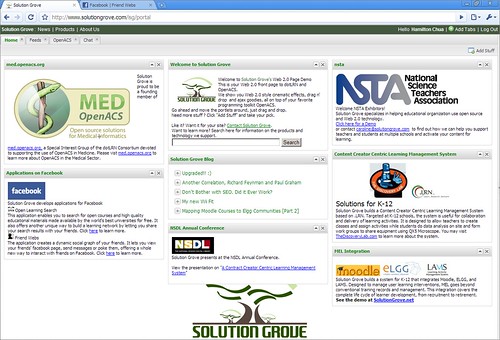
Excited to see how this new browser does Ajax and DHTML,
I loaded up the Solutiongrove.com portal page ...
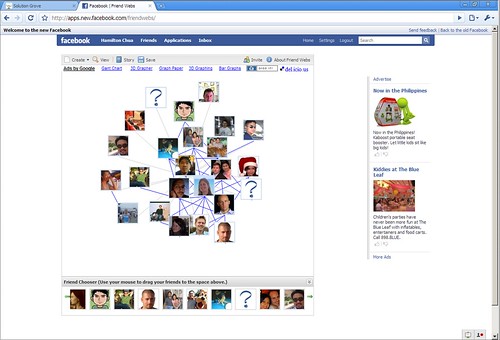
... and our Friend Webs facebook app
Not bad !
Flash, SVG, Ajax and Javascript all work nicely and quite fast too. Java it seems though isn't supported yet.
Developer Tools
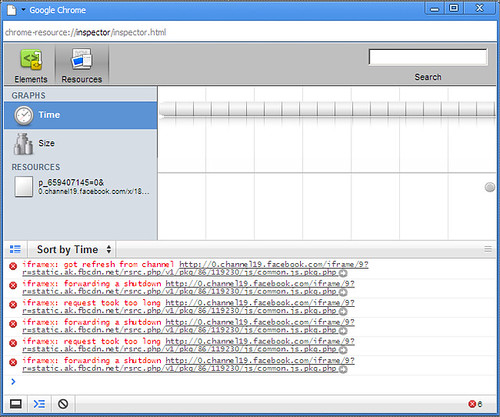
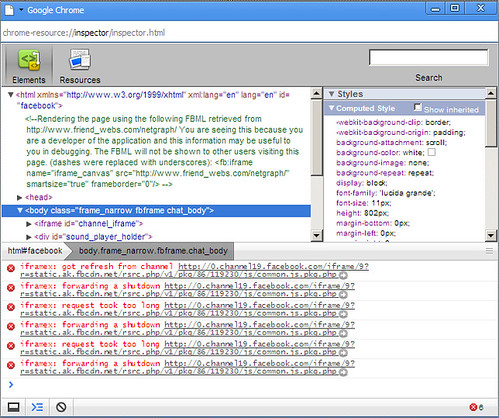
The saddest part about this is that I may one day (if it manages to steal enough market share from IE and Firefox) need to include this browser in our QA process. However, Google hasn't forgotten us web developers when they released chrome. They included some developer tools (see screenshots below) which you can access by clicking the "control the current page icon".

It's hard to say whether these tools will be as good as Firebug on Firefox but at least they're there.
Final Words
Download and install is streamlined and easy especially for novices.
Browsing is fast and the software feels stable.
Google hasn't forgotten web developers with this browser thanks to the inclusion of developer tools.
Tuesday, September 02, 2008
Google Chrome
2 years ago I mentioned in a blog post how the browser will play pivotal role in implementing COMET.
Today Google is stepping up with their own web browser. It's too early to say whether this new browser will herald the coming of faster, more powerful web apps, however, if the comic is any indication, Google is giving Mozilla and Microsoft a serious run for their money.
Today Google is stepping up with their own web browser. It's too early to say whether this new browser will herald the coming of faster, more powerful web apps, however, if the comic is any indication, Google is giving Mozilla and Microsoft a serious run for their money.
Wednesday, February 27, 2008
gearsAJAXHelper: Using Gears as an optional speed boost
I remember trying to do something along these lines a couple of months back. You still need gears to be installed on your browser though.
Read more about gearsAjaxHelper
Read more about gearsAjaxHelper
Wednesday, December 26, 2007
Check your Gmail filters .... and I mean NOW !!!!
Before anything else, login to Gmail now and check your filters and POP Forwarding settings and make sure there aren't any strange filters or e-mail address you don't recognize.
I read an incredibly alarming item from digg today about how an unscrupulous hacker stole someone's domain name by hacking into the person's gmail account.
David Airey, the victim, tells his story and the on-going saga to get his domain back in this blog post. If you're a freelancer, your website is your life, I can just imagine the emotional distress he is in.
According to the blog post, Google has already fixed this but the fix will NOT remove filters or settings that have been added or changed by the exploit, so I say again, check your Gmail account now.
Details of the hack can be found in http://www.gnucitizen.org/blog/google-gmail-e-mail-hijack-technique/
I read an incredibly alarming item from digg today about how an unscrupulous hacker stole someone's domain name by hacking into the person's gmail account.
David Airey, the victim, tells his story and the on-going saga to get his domain back in this blog post. If you're a freelancer, your website is your life, I can just imagine the emotional distress he is in.
According to the blog post, Google has already fixed this but the fix will NOT remove filters or settings that have been added or changed by the exploit, so I say again, check your Gmail account now.
Details of the hack can be found in http://www.gnucitizen.org/blog/google-gmail-e-mail-hijack-technique/
Subscribe to:
Posts (Atom)